
What’s included?
One system. From the menu to the kitchen ticket.
Ordering page, order-intake app, restaurant area and everything that brings guests back: every part explained in a picture.
Launching on 31 October 2026 – demos available now.
 3
3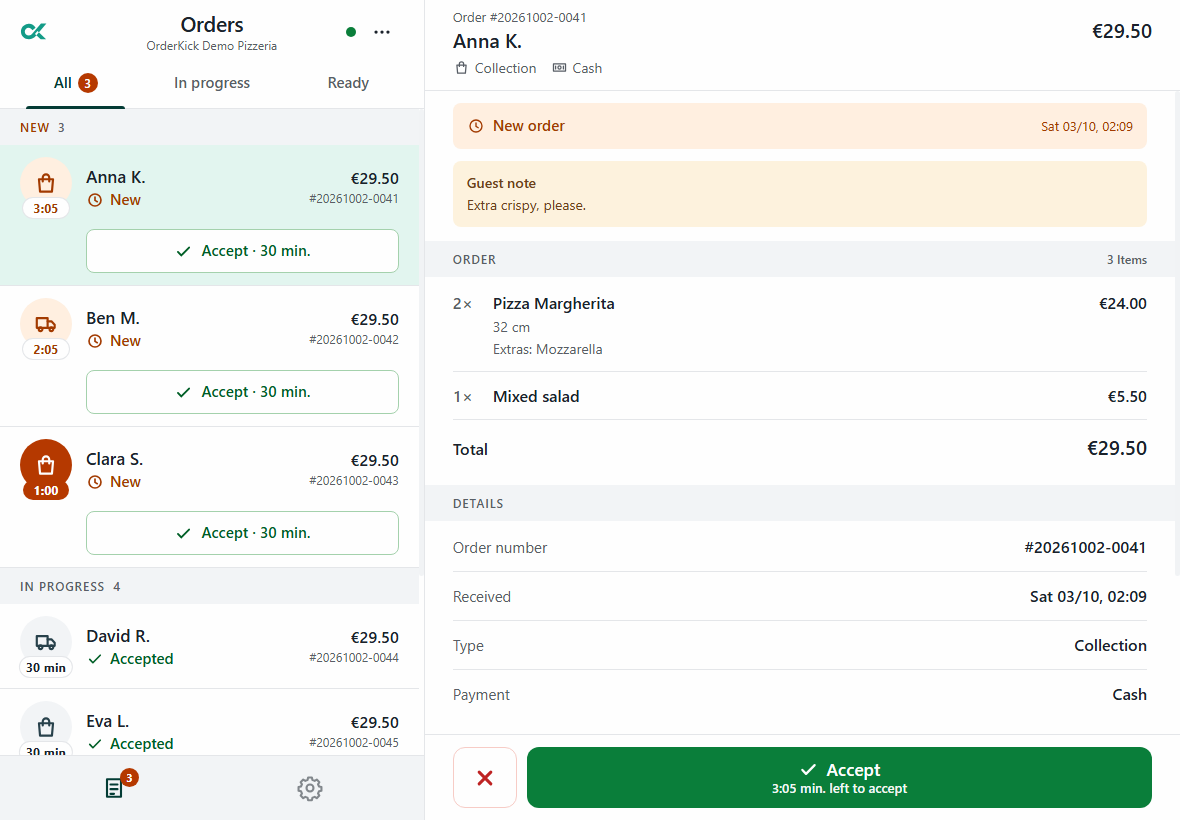 2
2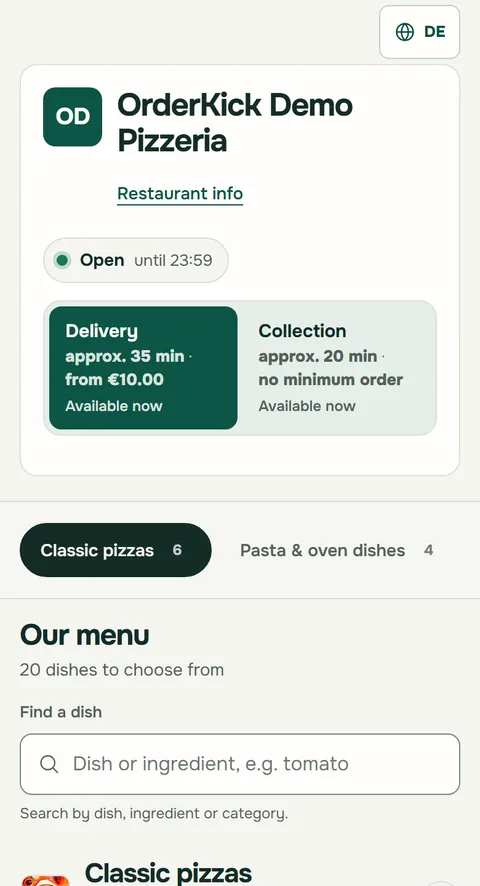 1
1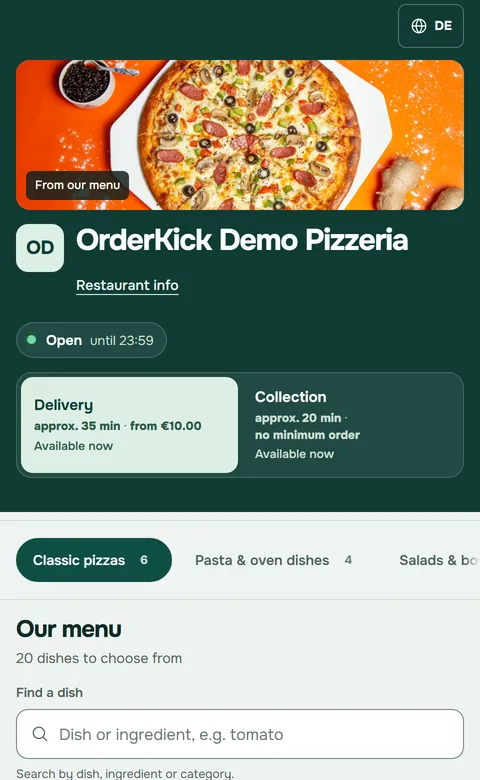 1
1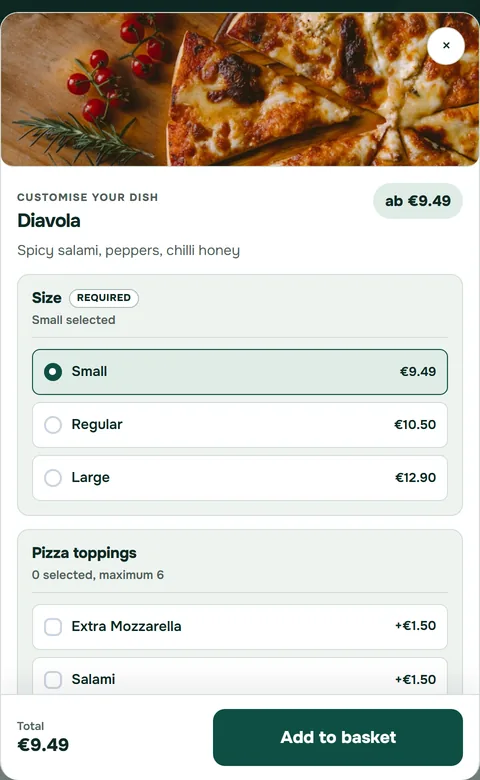 2
2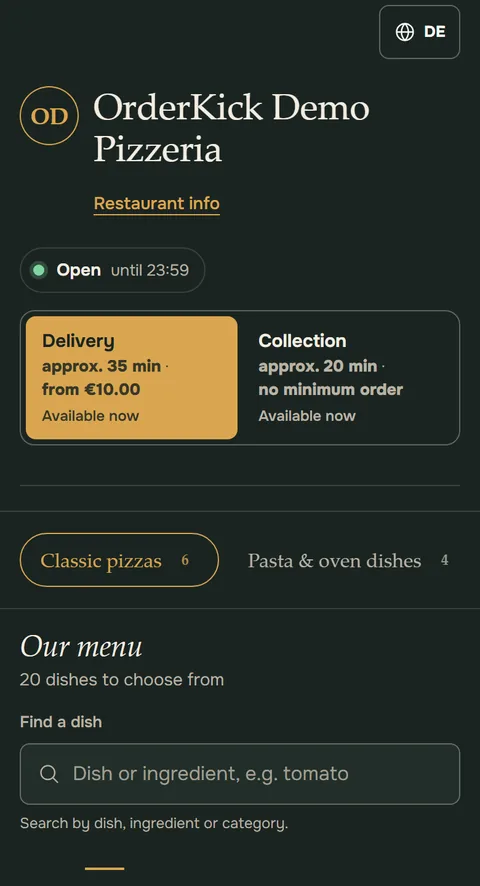 3
31/4How do my guests order?
Your ordering page. Made for phones.
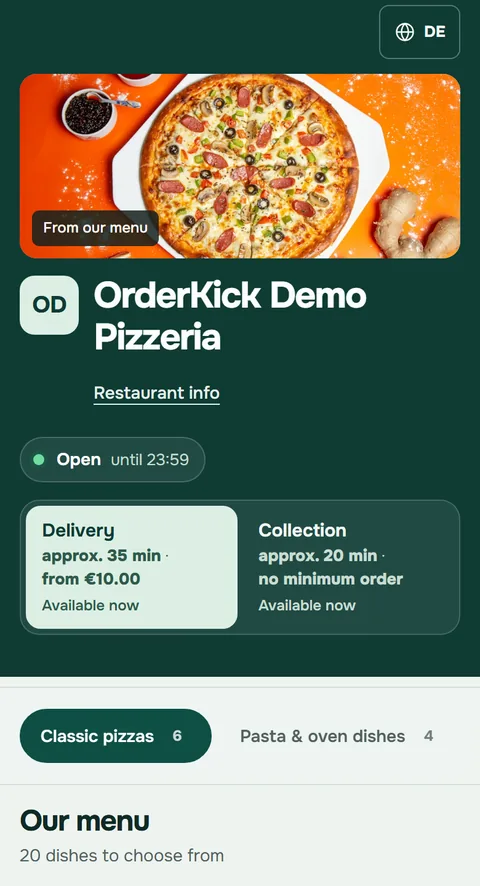
Guests order in the browser, with your name and logo. With the guest app add-on, also from their home screen.
- 1Menu with collection and delivery
Guests see opening hours, waiting time and minimum order before they choose.
- 2Sizes and extras at the dish
Required choices and paid extras, right where the guest chooses.
- 3Eight designs, German and English
This is the Slate design. You choose in the preview, with your own menu.
Delivery zones by radius, with a delivery fee and a minimum order. Guests pay in cash or by card on collection or delivery.
See all eight designs1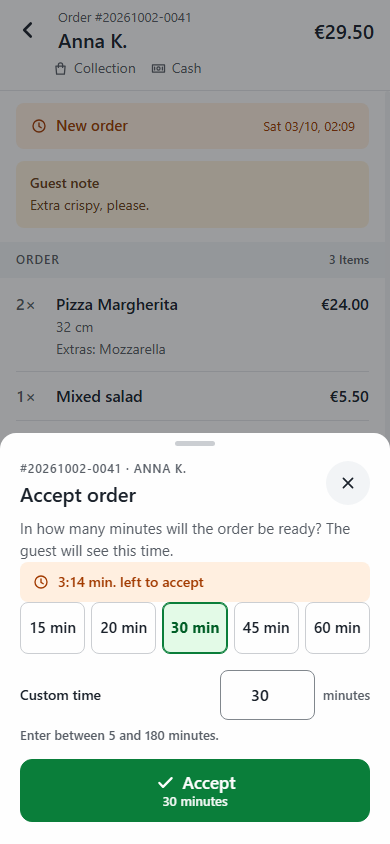 2Kitchen ticket3
2/4What happens when an order comes in?
Every order arrives loud and clear.
The order-intake app runs on an Android tablet or phone in your kitchen.
- 1New order with an alarm
With the guest’s note. Reservation requests arrive here too.
- 2Accept with a time
One tap on 15, 20 or 30 minutes, or your own time. The guest sees this time.
- 3Kitchen ticket on your printer
An Epson receipt printer with a network connection. We check which model fits during the demo.
Without a connected app your ordering page accepts no new orders, and your team gets an email.
One device is active per location. You pause delivery or collection for a while right in the app.
 1
1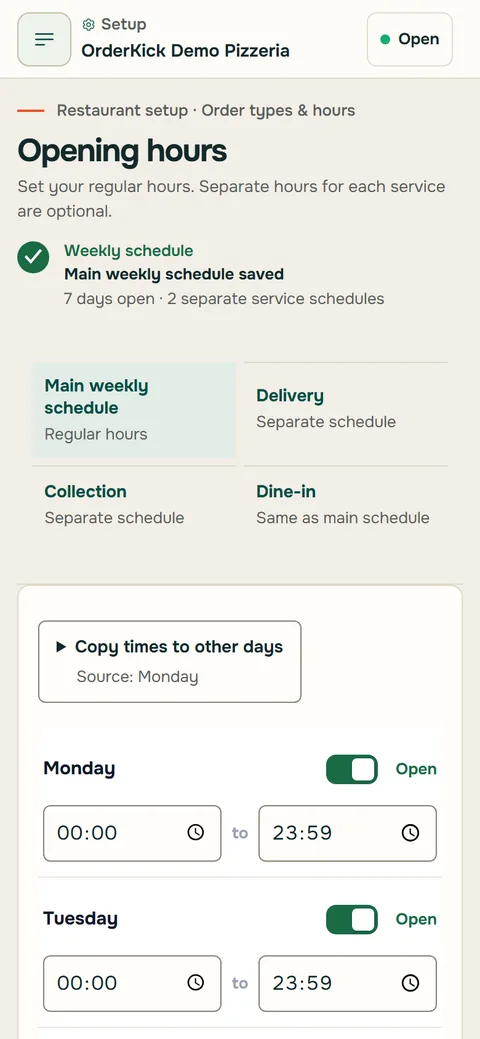 2
23/4Where do I manage all this?
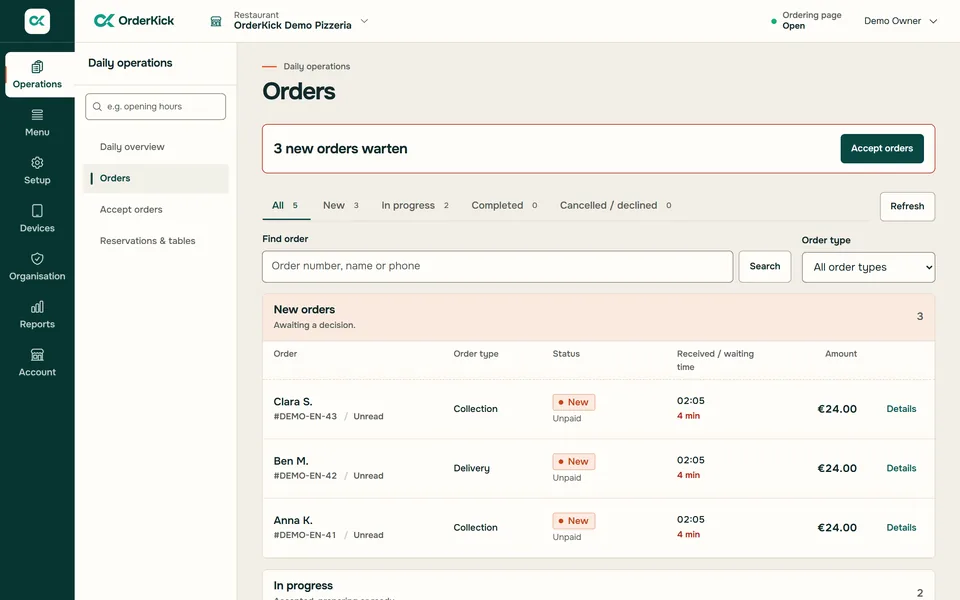
The restaurant area. In the browser, on your phone too.
Menu, hours, reports and invoices in one place.
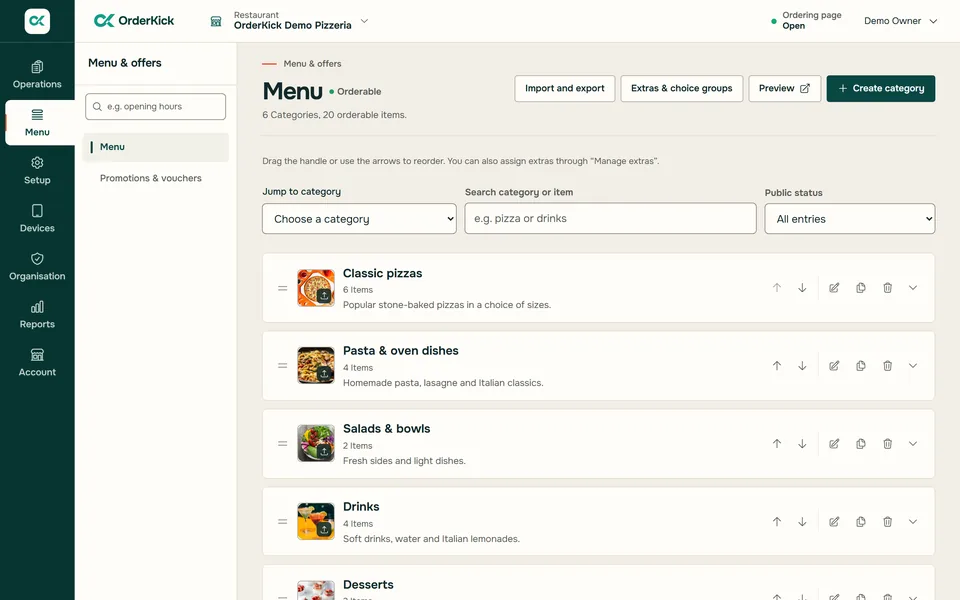
- 1Manage your menu
Categories, dishes, photos, sizes, extras and templates for options.
- 2Opening hours, breaks and special days
Hours per service, exceptions and special days, also on the go from your phone.
- 3Reports and invoices
Orders, trends and the end-of-day report, export as CSV or Excel. Invoices as PDF or e-invoice.
E-invoices and the DATEV file need complete invoice details. You agree the account assignment with your tax adviser.
4/4How do my guests come back?
Your link everywhere. Your guests come back.
Everything that brings guests to your ordering page, with no platform in between.
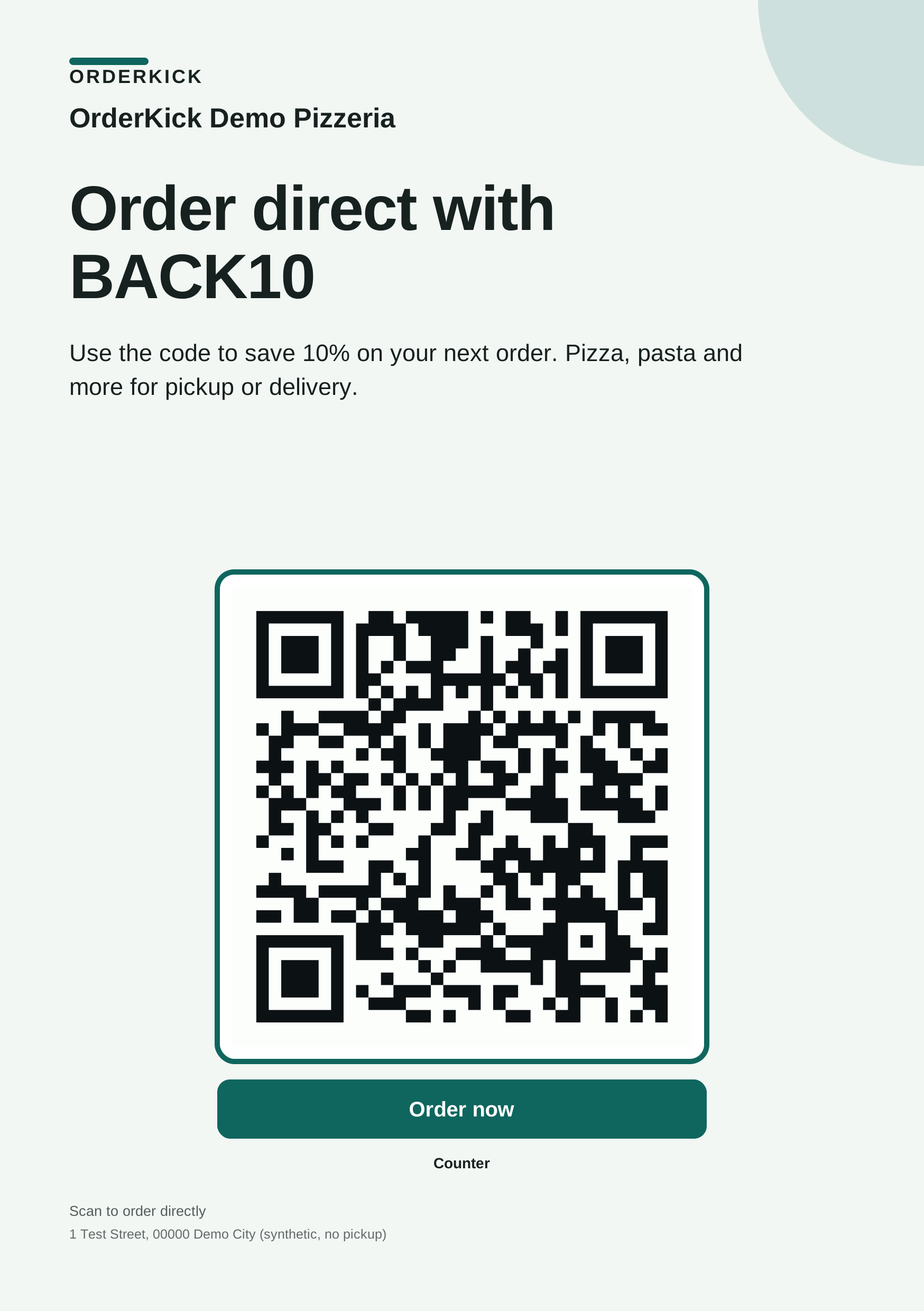
- 1Flyers and QR codes
A4 and A5 flyers with your QR code. You see how often it was scanned and ordered from.
- 2Ordering link and website button
A link per location and a button for your website. On request, a restaurant website on orderkick.com.
- 3Coupons and stamp card
Discounts, free delivery, bundles and stamps are applied automatically at checkout.
Plus online reservations with pre-ordered food and a QR code of its own for every table.
What else is in there?
Everything at a glance.
OrderKick · Data sheet
- Guests
- browser · guest app as an add-on
- Website
- button or OrderKick page
- Languages
- German and English
- Device
- Android tablet or phone
- Active
- one device per location
- Printer
- Epson with a network connection
- Export
- CSV · Excel · PDF
- E-invoice
- XRechnung 3.0.2 · ZUGFeRD 2.3.2
- Bookkeeping
- DATEV file
What OrderKick is not
- No marketplace. Guests order directly from you.
- No commission. You pay a fixed monthly price.
- No delivery service. You deliver yourself or guests collect.
1Ordering page
- Menu with categories, photos and search
- Sizes, variants and extras
- Collection and delivery, set up separately
- Delivery zones by radius, delivery fee and minimum order
- Eight designs with a preview
- German and English
- Guest app with your logo (add-on)
- Cash or card on collection or delivery
2Order-intake app
- Alarm for new orders
- Accept or decline
- Time by quick choice or your own
- Kitchen and customer tickets, reprint
- Pause delivery or collection
- Confirm reservation requests
- One active device per location
3Restaurant area
- Menu, photos and templates for options
- Hours per service, exceptions and special days
- Reports, trends and end-of-day report
- Export as CSV or Excel
- Invoices as PDF, XRechnung or ZUGFeRD
- DATEV file for bookkeeping
- On your phone too, German and English
4Bringing guests back
- Restaurant website on orderkick.com
- Ordering link per location
- QR codes as PNG and SVG
- Website button
- A4 and A5 flyers
- Scans and orders tracked without cookies
- Coupons, free delivery, bundles, buy one get one
- Stamp card
- Online reservations and table QR codes
Does it suit my place?
One restaurant or three. Collection, delivery or both.
- Collection only
- You set up collection and your own delivery separately. If you only offer collection, you simply leave delivery off.
- Your own delivery
- Delivery zones by radius, delivery fee, minimum order and delivery hours of its own. You deliver with your team.
- Several locations
- One shared menu for the locations you choose. You change prices and availability together and compare orders and revenue per location.
Each additional location: €29 a month plus VAT.
See several locationsGood to know
Questions about the features.
Still have a question?Support by email and WhatsApp. In the demo we go through your questions with you.
Ask on WhatsAppDo my guests need an app?
No. Your guests order in the browser, through your link, the QR code or your website. Regulars can use your guest app with your name and logo; it is an add-on. Only your team uses the order-intake app; one device is active per location.
How does my menu get in?
From GloriaFood you import your menu with the menu key or a file: first a preview with all notices, then the import as a hidden draft. Images are not transferred. Allergens and labels are imported when GloriaFood provides them unambiguously; please check them before publishing. From other systems you add categories, dishes, sizes and extras in the restaurant area. During the demo we go through your menu together.
Which printer do I need?
An Epson receipt printer with a network connection. We check which model fits during the demo. You connect and test the printer right in the app.
What happens if the internet or the app goes down?
Without a connected app your ordering page accepts no new orders, and your team gets an email. Your guests see a notice and can call you. As soon as the app is connected again, ordering continues.
How do my guests pay?
In cash or by card on collection or delivery. You decide which payment methods you offer.
Can I offer collection only?
Yes. You set up collection and your own delivery separately. For delivery you set delivery zones, a delivery fee and a minimum order.
Which invoices and exports are there?
You export reports as CSV or Excel. You create invoices as PDF, XRechnung or ZUGFeRD, and there is a DATEV file for your bookkeeping. Your invoice details must be complete for this.
Your next step
Your next ordering channel starts here.
We show you OrderKick with your own menu: 30 minutes, online via screen sharing. Reply by email within one business day.
And what does it cost? See pricing
Request a demoRather ask right away? Message us on WhatsApp